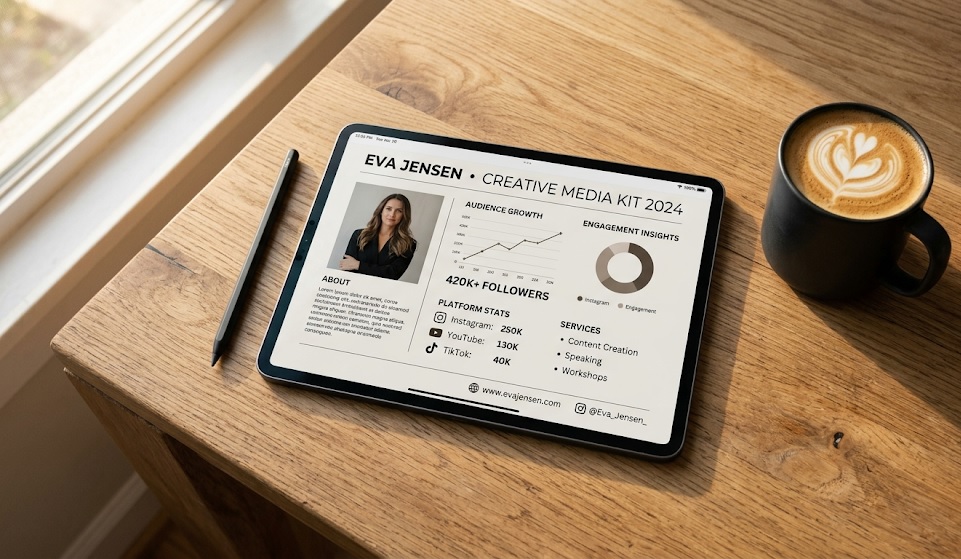
The Resume of the Creator Economy
Imagine walking into a high-level job interview at a Fortune 500 company wearing sweatpants and handing the CEO a piece of paper with your name scribbled on it in crayon. That is exactly what you are doing when you pitch a brand deal via a messy Instagram DM or a long, confusing email block.
In the professional marketing world, there is a language of business. If you want to be paid thousands of dollars, you need to speak that language. The cornerstone of that language is the Creator Media Kit.
A Media Kit is your digital resume, your portfolio, and your sales pitch all wrapped into one beautiful PDF. It proves that you are a serious business entity. And the best part? A beautiful Media Kit can make a creator with 5,000 subscribers look significantly more professional than a disorganized creator with 500,000 subscribers.
The "Less is More" Rule
Before we build it, understand this: Brand managers skim. They do not want to read a three-page biography about how you got your first camera at age 12. They want hard data, presented beautifully. A perfect media kit is typically 1 to 3 pages maximum.
The 5 Essential Pages of a Winning Media Kit
1. The Cover & 'Elevator Pitch'
This is the first impression. It needs a high-quality, professional headshot of you (no messy bedroom backgrounds). Right next to your photo, include a one-sentence "Elevator Pitch" that defines exactly what you do.
Example: "I help busy millennials build aesthetic, productive home offices on a budget."
2. The Audience Demographics (The Goldmine)
Brands are not buying your face; they are buying access to your audience's wallets. You must include screenshots from your YouTube or Instagram Analytics. Show them:
- Age & Gender: (e.g., 65% Male, ages 18-34)
- Top Geographies: (e.g., 40% USA, 20% UK, 15% Canada)
- Engagement Rate: This is crucial for smaller channels. If your views are low but your engagement rate is 8% (industry average is often 2-3%), highlight that in bold!
3. The "Case Study" or Past Work
If you have worked with brands before, show the logos here. But don't just paste a logo. Include a "Case Study" block. "Integrated NordVPN into a 60-second mid-roll. Result: 15,000 views and a 4% click-through rate on the description link."
What if you have no past sponsors? No problem. Highlight your best-performing video. Show its stats and explain why your audience loved it. It proves you understand how to make engaging content.
4. Your Offerings (What Can They Buy?)
Make it easy for them to buy from you. List your available packages clearly. For example:
- Dedicated YouTube Video (5-8 mins)
- 60-Second YouTube Mid-roll Integration
- YouTube Shorts + Instagram Reel Cross-post
Pro Tip: Should you put your prices on your media kit? It's heavily debated. As a beginner, I recommend leaving prices OFF the kit. Say "Rates available upon request." This forces them to reply to your email, allowing you to negotiate based on their specific budget.
5. Clear Contact Information
End the document with a clear call to action. Include your professional email (not gamerboy99@gmail.com, use a custom domain or clean address), your primary social links, and a friendly sign-off.
The Ultimate Shortcut: Don't Build It From Scratch
If you aren't a graphic designer, do not try to build this from scratch in Microsoft Word. It will look terrible.
We built the Webyug Media Kit Generator exactly for this reason. You simply type your stats into our form, upload your picture, and it instantly generates a stunning, agency-level PDF that you can download and attach to your pitches. It takes 2 minutes and it's completely free.
Stop letting amateur presentation kill your brand deals. Upgrade your Media Kit today, send out 10 professional cold emails this week, and watch how the brands start treating you differently.